What you’ll need
Before you start
Email login
The MatchTrader email tied to your funded or demo profile.
Password
Current MatchTrader password — rotate if your broker requires resets.
Server / platform URL
The hostname or branded MatchTrader URL supplied by your broker or prop firm.
How the connection works
Overview
TraderWaves establishes a MatchTrader trading account session, validates credentials against your broker stack, and imports fills into your journal pipeline.
Step-by-step setup
Walkthrough
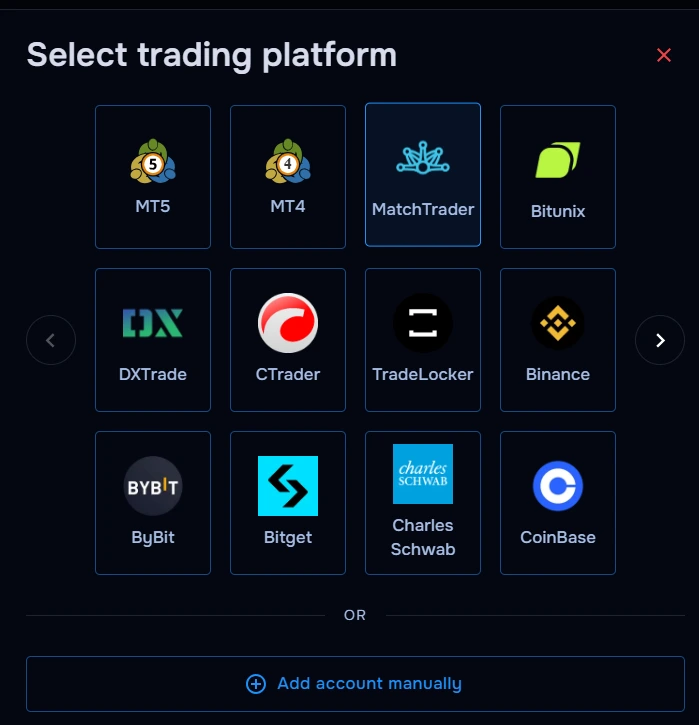
- Select MatchTrader inside TraderWaves.
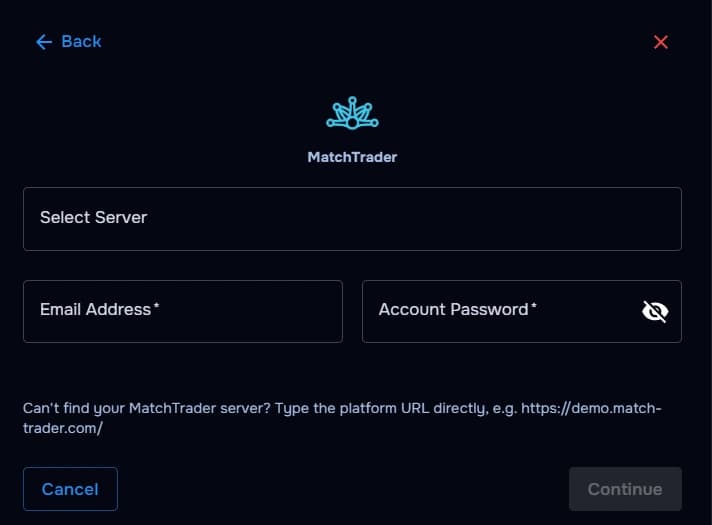
- Select your Server or type the platform URL directly, e.g. https://demo.match-trader.com/ .
- Enter your MatchTrader email.
- Enter your MatchTrader password.
- Authorize sync and wait for history import.
What happens after connecting
After sync
MatchTrader executions appear in your journal with analytics overlays for session stats and risk metrics.
Security and permissions
Trust & access
Your login credentials are securely encrypted and never shared outside of TraderWaves. For additional security, you can connect using investor credentials where supported.
Prefer manual trade tracking?
TraderWaves also supports manual trade journaling when you want full control over how trades are logged.
Troubleshooting
Common issues
Platform URL rejected
Likely cause: Typo or outdated branded hostname.
Suggested fix: Copy URL directly from broker onboarding email.
Email/password invalid
Likely cause: Credentials expired or SSO mismatch.
Suggested fix: Reset MatchTrader password via broker portal.
Trades not syncing
Likely cause: Prop desk latency or filtered symbols.
Suggested fix: Wait for broker propagation; review TraderWaves filters.
FAQs
Quick answers
Can I connect multiple MatchTrader accounts to TraderWaves?
Yes. You can connect multiple MatchTrader accounts and manage your trading performance across accounts inside TraderWaves.
Does TraderWaves support prop firm MatchTrader accounts?
Yes. TraderWaves supports many prop firm MatchTrader accounts, allowing you to track trades, analyse performance, and review journal activity in one place.
Can I manually journal MatchTrader trades instead of connecting my account?
Yes. TraderWaves also supports manual trade journaling if you prefer not to connect your MatchTrader account directly.
What happens after connecting MatchTrader to TraderWaves?
Once connected, your MatchTrader trades can automatically sync into your TraderWaves journal for performance tracking, analytics, and trade review.